About
Leonida Forge
Open-source GTA VI research and modding toolkit.
Leonida Forge is a community-driven project dedicated to researching GTA VI's file formats and scripting systems, and building tools to explore, analyze, and eventually modify them.
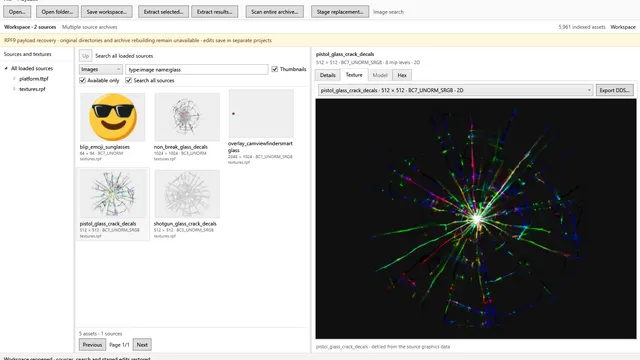
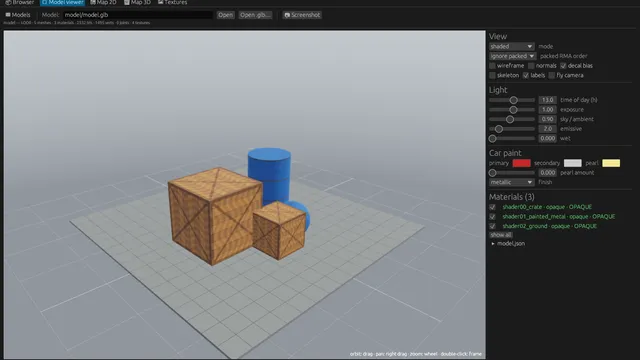
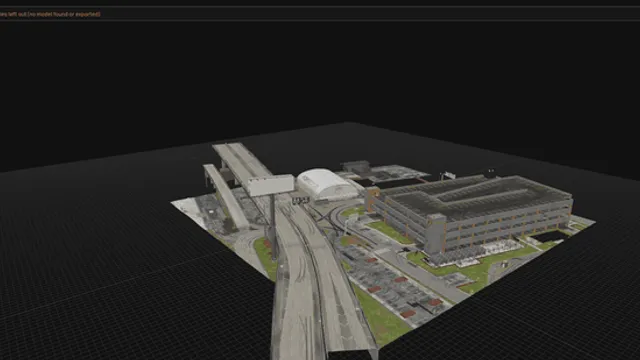
The project aims to provide a native desktop application and CLI featuring archive exploration, script decompilation, native function research, asset conversion, and future Blender integration.
Our goal is to make GTA VI modding more accessible through open research, shared knowledge, and reliable tooling.
Building
Leonida Forge currently builds on Windows 11 x64 only.
Requirements:
- rustup.
rust-toolchain.tomlpins the toolchain, and rustup installs it on first use. - Visual Studio Build Tools with the "Desktop development with C++" workload and a Windows SDK. GPUI needs the SDK's resource compiler.
- A GPU with Direct3D 12 support for the 3D viewport.
The first build fetches GPUI from the Zed repository, which takes a few minutes.
cargo run -p lforge-desktop    # desktop application
cargo run -p lforge-cli -- info --json
cargo test --workspace
The desktop executable is leonida-forge.exe and the CLI is lforge.exe.
The desktop app stores its settings in %APPDATA%\Leonida Forge\settings.json.
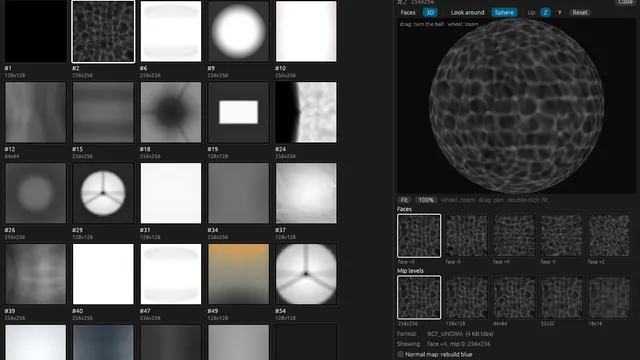
Debug builds have a Tools > Renderer Demo window for the 3D renderer.
Set WGPU_BACKEND (for example vulkan) to run it on a backend other than Direct3D 12.
Set RUST_LOG=warn to see log output from debug builds. Release builds have no console.
Binary Inspector
Double-click a file the explorer cannot otherwise open, or right-click any file and choose Open in Binary Inspector. Files inside archives are extracted to a temporary file first, up to 512 MB.
The CLI exposes the same operations on plain files:
lforge binary info example.bin --json          # size, signature bytes, SHA-256
lforge binary dump example.bin --offset 0x10 --length 128
lforge binary search example.bin --hex "52 50 46 37"
lforge binary search example.bin --text example --json
lforge binary interpret example.bin --offset 0x10 --endian big --json
lforge binary inspect example.bin --json       # recognised format and its structure
Offsets accept decimal or 0x hexadecimal. Exit codes: 0 on success, 1 when a command fails, 2 for invalid usage.
A format is recognised from the file's first bytes, never from its extension, and the inspector shows what was recognised next to the signature. The CLI and the desktop Binary Inspector use the same recogniser and parser in lforge-core, so a format means the same thing in both. binary inspect reports the recognised format, its parsed structure, the byte ranges it read and the ranges it left uninterpreted. --sample bounds how many records and entries are listed, --blocks reads every block's storage selector instead of the first few, and --verify inflates every zlib block and reports what failed.
Known formats are the RDS5 container, whose header, record array, ETPF chunk extent and block catalogue are parsed; the RBF0 prefix, of which only the 12 header bytes and the root name length are established; PSIN, by its four-byte magic only; and RPF9, which the archive commands read. PSIN is reported as recognition only: nothing relates it to a confirmed PSO format, and a PSIN payload gets no .pso extension. No payload bytes are printed. A structure that breaks the documented contract is reported and exits with code 1; a file that matches no format is reported as unrecognised and still exits with code 0.
RPF9 archives
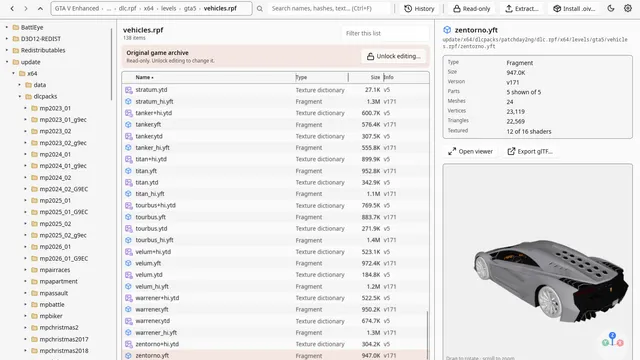
The explorer opens RPF9 and ZIP archives like folders. Double-click one to browse it. Archives are recognised by their contents, so the file extension does not matter. Archives stored in other archives open the same way, up to 8 levels deep. The explorer decompresses each one to a temporary file, up to 512 MB each and 2 GB per chain. To see the raw archive bytes, right-click it and choose Open in Binary Inspector.
When the RPF9 table of contents is stored without encryption, Leonida Forge reads its native entries directly.
In retail game archives the engine processes the table before reading it.
For those archives Leonida Forge can authenticate the table against a compatible local game executable that you select, and then list the archive's own entries.
Without such an executable, or when authentication fails, it offers to recover entries by scanning the data instead.
That is scan recovery, not a complete native archive index, and it does not make this a full native GTA VI RPF9 reader.
The first visit reads the whole archive. A 773 MB archive takes about 2 seconds from the disk cache.
The index goes to %APPDATA%\Leonida Forge\cache\rpf and is reused until the archive's size or modification time changes.
Recovered entries and native entries are never mixed in one list.
Local executable
Authenticated native listing needs a game executable that matches the archive, for example the game's main .exe from your own installation.
Choose File > Select Game Executable… and pick the file. File > Clear Executable removes the selection.
Only the path is stored, in the settings file above.
Leonida Forge opens the executable read-only, never copies or modifies it, and stores no keys, key state or IVs.
Nothing is downloaded, and no key service is used.
The recognizer checks the executable's structure and fails explicitly when it finds no compatible state, so a changed or unrelated executable simply does not authenticate.
If the file is moved, replaced or unreadable, Leonida Forge reports that and asks you to select it again.
Each time an archive is opened, the executable is checked against the file that was selected.
Inside an archive:
Recovered Entrieshas one folder per detected kind, such asXML,PSINorResources. Files are named after their archive offset, for example0x000000B000.xml. Original names and folders are unknown.Resource Pageshas one file per page of each reconstructed resource.Unrecovered Regionsholds bytes that are not zlib streams, shown as stored.
An entry is complete when it starts with a known file signature and ends with a chunk shorter than 64 KiB. Entries without a known signature are unverified and may be parts of larger files.
A RAGE resource is stored as one zlib stream per page, system pages first. Leonida Forge reads the page counts from the resource's page map and takes the pages from the streams that follow. A resource file holds its system pages, then its graphics pages. A resource is complete when every declared page is there and the page sizes fit the pattern seen in GTA VI data. It is partial when pages are missing, and unverified when its page map fails validation. These rules come from observed data, not from game code.
lforge archive info data.rpf --json            # header fields and a recovery summary
lforge archive list data.rpf --json            # entries, resource pages and unrecovered regions
lforge archive resource data.rpf 0x2010 --json # pages and checks of one resource
--no-cache neither reads nor writes the index cache.
lforge archive recover exports one recovered entry at a time, for archives whose native table of contents cannot be decrypted.
lforge archive recover data.rpf --list --json             # the recovery candidates
lforge archive recover data.rpf --id 0x0000000080 --output file.bin
A candidate is one recovered entry, identified by the archive offset of its first stream. The scan produces the same offset again for unchanged data, so the id is stable across scans. --list reports each candidate's observed properties, the offset, byte range, zlib compression, compressed and decoded sizes, and whether the bytes start with a known file signature, apart from its inferred ones, the content kind and the completeness status. Candidates are not native entries. They have no original names or paths, and the list is not a complete archive inventory.
recover --id ID --output FILE re-decodes one candidate and writes its bytes with the same output safety as archive extract. The streams are checked against the index as they are read, the output goes through a temporary file and replaces an existing file only with --overwrite, and a failed decode leaves no partial file. A partial or unverified candidate is written with a note that bytes may be missing. A decode that succeeds is not proof that the bytes are an authentic original file.
archive info, archive list and archive recover --list carry explicit schemas (leonida-forge.archive-info/1, leonida-forge.archive-list/1, leonida-forge.recovery-list/1). A payload that starts with PSIN is reported with the kind psin; earlier builds called it pso. Nothing establishes a relation to a PSO format, and the recovered entry is given no .pso extension.
Where the table of contents is stored without encryption, it can be read directly instead of scanned. With a compatible local game executable, --executable authenticates a processed table of contents first.
lforge archive metadata data.rpf --entries --executable game.exe   # the native entries and how each one reads
lforge archive ls data.rpf --executable game.exe --limit 20 --json  # one record per authenticated row
lforge archive search data.rpf --executable game.exe --name timecycle --json
lforge archive search "GAME_DIRECTORY" --executable game.exe --type 0 --readable true --json
lforge archive manifest data.rpf --executable game.exe --format jsonl --output manifest.jsonl
lforge archive extract data.rpf --row 42 --output file.bin --executable game.exe
archive ls, search and manifest reuse the same native table-of-contents reader as archive metadata; they never list unauthenticated rows, extract payloads or write key state. ls pages with --offset and --limit. search filters by resolved name substring, stored hash64/key32, type ID, confirmed extension, readability and archive path; it accepts one archive or a directory of archives. --hash matches only the column that the row's established type class makes authoritative: a 64-bit search never matches a 32-bit-class row, a 32-bit search never matches a 64-bit-class row, and an unknown class matches neither. manifest writes one record per row with an explicit schema (leonida-forge.native-manifest/1), as one JSON document or as JSONL with a header record followed by one row per line. 64-bit hashes, keys and payload offsets are strings so no value loses precision. .names.txt and --name-file work as they do for archive metadata.
Entries are identified by their row number in the table. archive metadata --entries lists them and reports, for each one, whether its contents are readable as stored, readable after supported decoding, or unavailable. When an entry is unavailable it gives the reason: an unsupported payload transform, an unsupported compression mode, a companion file that is missing or invalid, or malformed metadata. Readability is decided from the table of contents and the entry structure; a row reported as decoded can still fail when its compressed stream is read, in which case archive extract writes nothing and reports the error. It also reports whether the table was authenticated by a signature check or read without one because the archive needs no processing pass.
archive extract writes one entry to --output, decoded where its storage is supported. It handles stored bytes, raw DEFLATE, and chunked payloads whose chunks are zlib streams or copied, including entries whose bytes live in a companion file next to the archive. It refuses encrypted or processed metadata, payload transforms and compression modes it cannot decode, and companions that are not available, rather than writing wrong bytes. The output goes through a temporary file in the destination directory and replaces an existing file only with --overwrite; a failed decode leaves no partial file behind.
archive inspect reads one row or ZIP entry through the same decoder and reports its structure without writing a file:
lforge archive inspect data.rpf --row 42 --json --executable game.exe
lforge archive inspect data.rpf --row 42 --blocks --verify
lforge archive inspect outer.rpf --executable game.exe --enter row:12 --row 4 --json
lforge archive inspect outer.rpf --executable game.exe --enter row:12 --enter zip:3 --row 7 --json
lforge archive inspect outer.rpf --enter row:12 --zip 0 --json
lforge archive inspect outer.rpf --row 42 --raw --json
--enter SEL is repeatable and descends into an archive stored in the current one. row:N selects a native RPF9 row; zip:N selects a ZIP entry by central-directory index. The entered payload must be a valid archive recognised from its contents, never from its name. --row N and --zip N select the final entry in the last archive; without either, archive inspect FILE keeps reading row 0, and with --enter it inspects the entered archive itself. Entries are identified by index at every level, so two entries with the same visible name are never confused. The ZIP reader does not keep two entries with the same full name, so such an archive cannot be represented; identity is never taken from a name in any case. The same --enter selectors work with archive extract and archive ls.
An RDS5 row is reported field by field: header values, the record array, the ETPF chunk position and extent, the entry table, and one catalogue entry per data block with its stored range and storage selector. Only zlib is identified as a block codec; a block with another selector, or with the zlib selector and no zlib header, is reported as unidentified and is never decoded by guesswork. --verify inflates each zlib block, reports the blocks that fail and compares the decoded total with the declared uncompressed total. Rows in the RBF0, PSIN and RPF9 formats are reported by prefix or signature only. In every case the row is decoded in memory; nothing is extracted and nothing is written.
Structured inspection reads the decoded logical payload: an entry stored as raw DEFLATE or in chunks is decoded first, and an unsupported transform or codec is reported as a decoding failure instead of being passed to a parser. --raw asks for the bytes as they are stored instead. For a row stored compressed, in chunks or behind a transform, that is the stored representation before decoding, which may include alignment padding; it is never presented as the row's decoded contents.
The inspection document uses schema leonida-forge.format-inspection/2. Version 2 adds provenance, representation and failure_stage; the version 1 fields keep their meaning. provenance reports the root file, every --enter step in order with its selector and archive format, the per-level authentication status where an RPF9 table was opened, the decoded byte total, and that a valid metadata signature does not authenticate payload bytes. representation states whether the inspected bytes are logical or stored and whether they were decoded, with the decode error when they were not. Offsets stay hexadecimal strings.
Nested traversal enforces the same limits at every level: at most 8 archives in a chain, 512 MiB decoded per intermediate archive, 2 GiB decoded per chain, 1M rows or ZIP entries, checked offset arithmetic, cancellation and automatic temporary-file removal. An RPF9 archive at any depth is opened through the same metadata authentication as a top-level one; without a compatible executable, a processed table of contents is refused rather than read unverified.
The decoded state in archive metadata, ls, search and manifest remains a structural state: it is decided from the table of contents and the chunk table, without inflating a stream. Use archive inspect --verify to check a row's streams, or archive extract to obtain the bytes.
RPF9 stores a hash of each entry's path, not the path. archive metadata --entries always shows the stored hash and key. A name table can add candidate names, but a name is display data: it never changes a row's key, a payload offset, an authentication result or an extraction destination. Two LUT files, rpf9-hash64.lut and rpf9-key32.lut, are embedded in the binaries and always applied; a file with either name beside the executable is read as well and merged over it, which refreshes the table without a rebuild. --name-file FILE is repeatable and accepts a .names.txt table or a Leonida Forge LUT; without it, <archive>.names.txt next to the archive is used when present. The .names.txt format is UTF-8, one entry per line: a candidate path, or hash64:HASH<TAB>NAME and key32:HASH<TAB>NAME for a declared key. Candidate paths are verified by hashing them with the type's class. A declared name is verified only when its normalized form or its stem reproduces the key; otherwise it is reported as unconfirmed. Use --archive-path, --mount-prefix and --extension to describe paths that the built-in rpf mapping cannot.
The desktop explorer labels an entry with a verified unambiguous name, otherwise with the stored key in canonical hexadecimal form. rpf to type 0 is the only confirmed extension, so other type IDs get no invented extension. Types 11, 14 and 255 use the 32-bit key class, established from the executable's per-type tables. For type 255 the published key32 records resolve 125 rows; for type 11 the key32 records resolve 134 of 865 rows, whose stored keys reproduce joaat of harvested path stems. Types 11 and 14 still have no confirmed extension, and a type 11 name is a hash preimage, not an established original filename. Row numbers remain the entry paths and stay in details. Names come from the same embedded LUTs, <archive>.names.txt tables, and candidates in the LUT files beside leonida-forge.exe; a .lut next to an archive is not read.
The type-255 row count appears in several measurements that are not interchangeable:
- A harvest match record is one candidate string in one payload whose hash equals a stored key. One payload can produce many records.
- Distinct matching keys are the unique hash values among those records.
- Rows matched by harvesting are table rows whose class-authoritative key is one of those hashes. One key can address several rows, so the row count can exceed the key count.
- Rows resolved by the final LUT are rows whose class-authoritative key is in the published, validated table, after duplicate, ambiguous and provenance-rejected candidates are removed.
- Rows rejected through type-class validation matched only through a column their type class does not make authoritative, or through an unknown class.
The harvest matched 177 type-255 rows, the published key32 table holds 106 type-255 keys, and the final table resolves 125 type-255 rows. The key and row counts differ because rows can share a key; the harvest and final row counts differ because validation and publication are stricter than a bare match. The counts come from different stages and are not adjusted to agree.
A native archive can be shown by the folders its verified relative paths describe, or as one flat list of every row. The toolbar switches between them, the choice is stored in settings, and switching re-lists from the table of contents already in memory. Row paths stay <folder>/Row NNNNN in both modes, so selection, preview, inspection and export keep working. The filter box matches a visible label, a stored name hash or key, a type, or a resolved candidate, without indexing the archive.
When a verified name is a relative path, the explorer shows it as folders, so levels/americas/props/vampires_metadata.rpf is filed under levels, americas and props. The archive stores no folders; each entry keeps its path <folder>/Row NNNNN, so a row has exactly one path. Names are untrusted input: absolute paths, ., .., empty components, drive letters and characters Windows refuses are never used to build a folder, and such a row keeps its stored key as the label. Rows without a usable path are listed after everything else in Unnamed Entries, labelled by their stored key. An archive where no name gives a usable path is listed flat at its root. The only folders an RPF9 archive stores itself are nested archives, which stay entries.
The native index and candidate pipeline are available without a network service:
lforge names index "GAME_DIRECTORY" --executable game.exe --json
lforge names harvest "GAME_DIRECTORY" --executable game.exe --sources payloads,executable --output results.jsonl --json
lforge names export results.jsonl --format lut --output resolved.lut --json
lforge names audit --research path/to/research/names --json
names index authenticates each .rpf recursively and builds an in-memory index of stored keys and rows. It reports per-type counts of which key column each row populates, separately from the class the executable establishes. names harvest extracts bounded path-like strings from readable payloads and initialized executable sections, hashes a small set of variants, and writes local JSONL evidence for hash matches; its summary breaks matches down by source, namespace, archive and type, and reports unresolved and ambiguous keys. names export writes one validated LUT per namespace (resolved.hash64.lut, resolved.key32.lut when both are present) and reports which source and namespace each accepted record came from. names audit re-hashes every bundled LUT record, reports unverified entries, ambiguous keys, duplicate spellings and unsafe paths, and compares the bundled tables with a Research checkout's names directory when --research is given. It reads only and downloads nothing. A hash match is a candidate, not proof of the original developer filename; 32-bit matches are weaker. The LUTs embedded in the binaries are the verified mappings published in the research repository; copy a newer file beside the executable to refresh them.
AI Contributions
AI-enabled, not AI-driven.
We welcome the use of AI as a development tool, but contributors are expected to understand, review, and take responsibility for their work.
AI-generated code is not inherently a problem. Unreviewed, untested, or poorly understood code is.
- Understand the code you submit and be able to explain your changes.
- Review and test AI-assisted contributions before submitting them.
- Follow existing conventions instead of introducing unnecessary abstractions, boilerplate, or documentation.
- Keep pull requests focused, maintainable, and backed by actual effort.
Low-effort, AI-generated pull requests submitted without meaningful human review or validation will be rejected.
AI can assist your work. It should not replace your judgment.
License
Leonida Forge is licensed under the GNU General Public License v3.0 or later (GPL-3.0-or-later). See LICENSE.md.
Disclaimer
Leonida Forge is an independent, unofficial community project and is not affiliated with or endorsed by Rockstar Games or Take-Two Interactive.
Grand Theft Auto and related trademarks belong to their respective owners.
Versions
- 92af6e2current25 Nov 2026Download 92af6e2
Source code at this commit. The repository has no packaged release.