 1 / 3
About
Download the latest release | Windows, macOS and Linux | Free and open source (GPL-3.0)
Save Garage edits your GTA VI story-mode save on PS5: money, ammo and stats. It needs no jailbreak and installs nothing on the console. Your PS5 sends the save to your computer through its own Data Transfer feature, you edit it in your browser, and the PS5 takes it back the same way.
What you can change
| What | Status | |
|---|---|---|
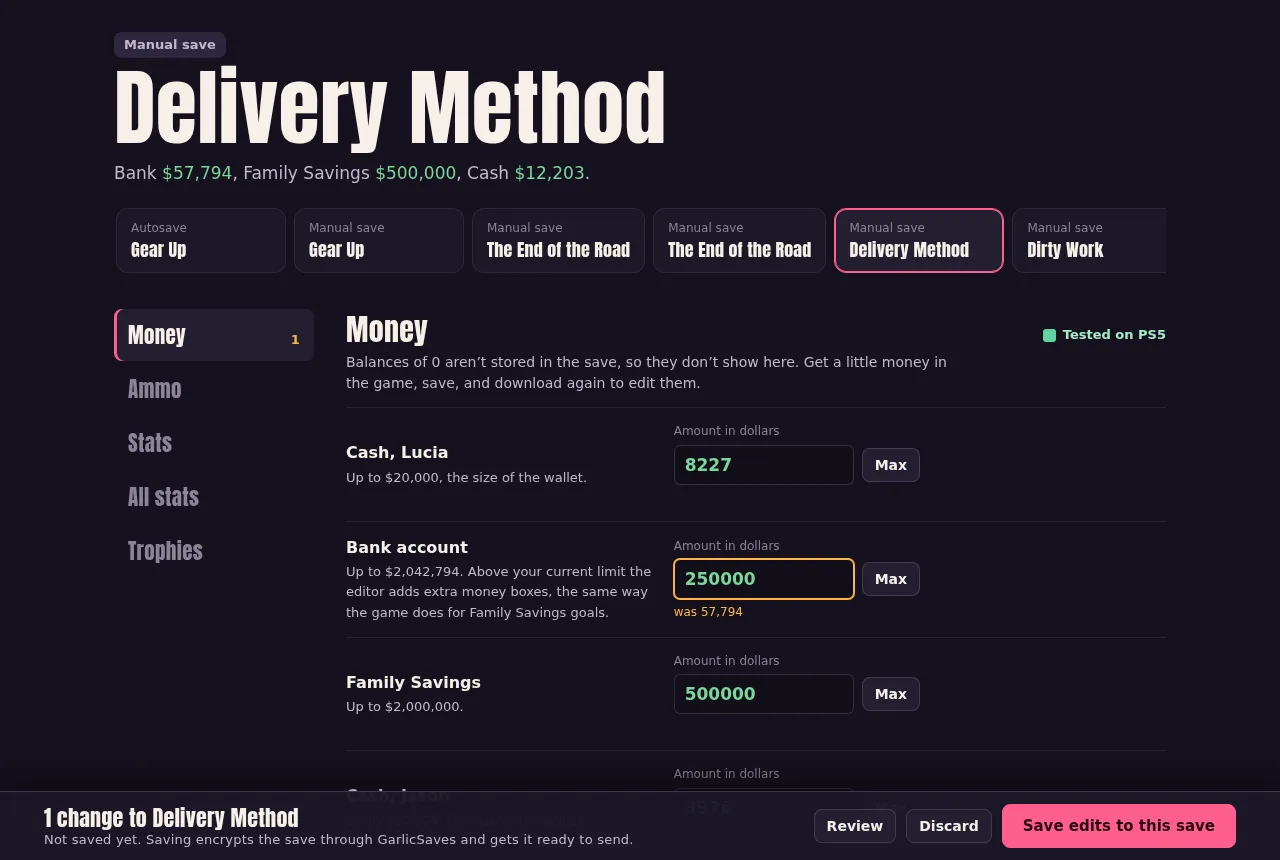
| Money | Bank account, Family Savings and cash for Lucia and Jason. Family Savings goes up to about $2,000,000. The bank goes up to what its own money boxes hold at your point in the story, because shops only spend from those. Cash goes up to $20,000. | Tested on PS5 |
| Ammo | Every ammo type each character is carrying, named the way the game names it, with one click to refill to a full load (for example 300 assault rifle rounds) or to set the maximum of 9,999. Also lists the weapons each character carries. | Tested on PS5 up to a full load; a save with more loads fine |
| Stats | 90 stats named the way the game's own stats screens name them: 100% completion, time played, health, stamina and focus overpowers and buffs, distance, money earned, wanted stars, kills, shots fired, vehicles stolen, fish caught and more. Each one has a sensible maximum: the game's own total where there is one (130 stunt jumps, 80 challenges, 8 vaults), otherwise a cap far above a long playthrough. | Tested on PS5, except times, distances and the story and styles percentages |
| Trophy counters | Stunts, challenges, discoverables, collectibles, collectible cards and vaults robbed. | Tested on PS5 |
| Completion | Marks every stunt done (jumps, base jumps, under-the-bridge flights and knife flights), discovers every animal and seen weapon in the compendium and every kind of shop and place on the map, completes challenges by category, adds all 8 gym memberships, completes the meditation spots, marks every robbery location and vault fully hit, records the fencing still missing, completes races, ranges, video games, pool, mini golf, drone trials and Bret's decks, scores all 100 basketball hoops, fills the vehicle compendium to 200 base models and marks every collectible card, luxury watch and identified magazine found (book swaps, magazine styles and cocaine flamingos as experimental options), each with the counters the 100% checklist reads, then works out the 100% figure the way the game does. Shows the game's whole 100% checklist, what each line can be set to, and the new 100% figure before you save. | A save with every option loads and plays on PS5; gym memberships, map discoveries, meditation and fencing confirmed in game, the rest not checked yet |
| World | The time of day (the date stays the same), health up to overpowered, and full armour for both characters. | Not tested yet |
| All stats | Every one of the 23,760 stats in the save, searchable, with the game's own wording for the stats it shows and recovered names for most of the rest. Where a real name is still unknown, a plain description of what the stat holds is shown instead, so 99% of the rows in a full-story save read as words. | Can break your save |
| Save data | Every section of the save, with names for 64 of the 82 sections and 610 of the 843 keys. Values that are the ID of a known item, stat, place, mission, news article or social media post show its name or opening words. Any number or true/false value can be changed; text, the story flow, heists and vehicle records stay read-only. | Can break your save |
| Trophies | Not editable. The Trophies page in the app explains what a save edit can and can't do for them. | |
| Languages | The app in English (the default), Deutsch, Nederlands, Français, Español, Português (Brasil), Italiano, Polski, Русский, العربية (right to left), 日本語, 한국어 and 中文(简体). Pick one at the top of the page; the choice is remembered. Names from the game stay as the game writes them. The translations were made with the help of AI, not by native speakers, so corrections are welcome as an issue or pull request (ui/i18n/<language>.json). |
Every edit in the app carries one of those labels, so you always know how safe it is. Edits are always applied to your original save, and the original is backed up on your computer before anything changes.
Before you start
- A PS5 with GTA VI (PPSA01547 or PPSA38500). Tested on system software 14.23.
- A Windows 10 or 11 PC, a Mac, or a Linux computer on the same home network as the PS5.
- An internet connection: decrypting and re-encrypting the save runs on the GarlicSaves service.
How to use it
- Download and start Save Garage from Releases. Your browser opens the editor at
http://127.0.0.1:7283. Keep the small Save Garage window open while you use it.- Windows: unzip
SaveGarage-…-windows-x64.zipand double-click Start Save Garage.bat. Everything it needs is inside the folder. If SmartScreen appears, click More info, then Run anyway. When Windows Firewall asks about Python, allow it on private networks: the PS5 needs to reach your PC. - Mac: unzip
SaveGarage-…-macos.zipand double-click Start Save Garage.command. The first time, right-click it and choose Open. It needs Python 3.9 or newer (python.org) and sets itself up on the first start. Allow access to devices on your local network when asked. - Linux: unpack
SaveGarage-…-linux-x64.tar.gzand run./SaveGarage --open. See Linux notes.
- Windows: unzip
- Connect. Click Find my PS5, or type its IP address.
- Pair (once per console). Click Start pairing, then on the PS5 go to Settings, then System, then System Software, then Data Transfer, and pick Save Garage Pairing. The PS5 says it can't transfer data. That's expected: pairing has already happened.
- Download. In GTA VI, save your game and go back to the PS5 home screen. Click Download save. When the app asks, press the PS5 power button once and let go at the beep. The console restarts into transfer mode, and again when the download is done. If more than one account on the PS5 has a GTA VI save, the app asks which account's save to edit; pick one straight away, while the PS5 waits in transfer mode.
- Edit. Pick a save (the autosave is what Continue loads), change what you want and click Save edits.
- Send back. Delete the GTA VI save on the PS5 (it won't overwrite an existing one): Settings, then Saved Data and Game/App Settings, then Saved Data (PS5), then Console Storage, then Delete. Then click Send save to PS5 and on the PS5 open Data Transfer, pick Save Garage and choose Start Transfer.
Start small: change a couple of things, send the save back and check it loads before you change more. If a save won't load, delete it on the PS5, click Put the originals back and send again.
What leaves your computer
Your save is encrypted with a key that never leaves the PS5, so Save Garage sends the encrypted save to the GarlicSaves service to decrypt it, and the edited save to re-encrypt it for your account. That upload includes your PSN account ID, which is stored in the save. GarlicSaves runs the work on PS5 consoles of its own. Its consoles also work out the keys for each Data Transfer session.
Nothing else is uploaded. The editor runs only on your computer, and by default only your computer can open it.
Originals and backups stay in %LOCALAPPDATA%\SaveGarage on Windows, ~/Library/Application Support/SaveGarage
on a Mac, ~/.local/share/SaveGarage with the Linux build, and the data folder when you run from source.
Good to know
- Money is capped by the game. Each account holds money in boxes of a fixed size. Family Savings gets the larger boxes the game itself uses for savings goals. The bank stays within its own boxes, because shops only spend money from those: versions before 1.24.0 put extra money in Family Savings boxes under the bank, which BuckMe showed but shops couldn't spend (issue #3). Editing the bank again, or Make it spendable on the Money tab, moves it back. Cash stays at the $20,000 wallet.
- A balance of 0 can't be edited. The game doesn't store it. Get a little money in the game, save and download again.
- Only ammo you carry is listed. Pick some up in the game first to add a new type.
- Turn off PS Plus auto-sync for GTA VI while you test an edited save, so it can't replace your cloud backup.
- Trophies can't be written by a save editor. Spending money you added still unlocks money trophies the normal way. Trophy-hunting sites such as PSNProfiles may flag trophies earned with a save editor.
- Online play isn't affected. Save Garage edits story-mode saves only.
Troubleshooting
| Problem | Fix |
|---|---|
| The PS5 doesn't list Save Garage Pairing | Check the PS5 and computer are on the same network, and that your firewall allows TCP 1004-1005 and UDP 1006 from the PS5. |
| Pairing or sending fails at once with a permission error | On Linux, ports below 1024 need permission. See Linux notes. |
| Ports 1004 to 1006 are in use | Close any other save-transfer tool or second copy of Save Garage. |
| The PS5 says there's nothing to transfer | A GTA VI save is still on the console. Delete it, then open Data Transfer again. |
| Decryption service offline | Check your internet connection. GarlicSaves may also be down for a while. |
Linux notes
Run from source (below). The PS5 protocol uses ports 1004 to 1006, which Linux keeps for root. Allow them while you use Save Garage, and set it back afterwards:
sudo sysctl -w net.ipv4.ip_unprivileged_port_start=1004
sudo sysctl -w net.ipv4.ip_unprivileged_port_start=1024
To use the editor from another device on your network, start it with your computer's address, for example
python3 engine/main.py --host 192.168.1.20. Only devices on that /24 network are allowed in.
Run from source
Python 3.10 or newer and curl are required.
python3 -m venv .venv
.venv/bin/pip install -r requirements.txt          # Windows: .venv\Scripts\pip install -r requirements.txt
.venv/bin/python engine/main.py --open             # Windows: .venv\Scripts\python engine\main.py --open
Options: --port N (default 7283), --host ADDRESS, --allow NETWORKS, --no-browser.
Release files are built on Linux with scripts/package_release.sh: a portable Windows
folder with the official embeddable Python, a Mac launcher, and a self-contained Linux build, plus SHA256SUMS.txt.
scripts/build_windows.bat and scripts/build_macos.sh make single-folder builds with PyInstaller on those systems.
Credits and license
Save Garage is free software under the GNU GPL v3. It started from gta6-save-editor by CoreyLyu76 and includes PS5 Data Transfer code from GarlicTransfer by earthonion, both GPL-3.0. Details in CREDITS.md.
Save Garage is not affiliated with or endorsed by Rockstar Games, Take-Two Interactive or Sony Interactive Entertainment. Grand Theft Auto and PlayStation are trademarks of their owners. Use it on your own single-player saves. Editing a save can break it, so keep your backups.
Versions
- v1.25.0current25 Nov 2026Download v1.25.0 (16 MB)
Save Garage 1.25.0
- v1.24.025 Nov 2026Download v1.24.0 (16 MB)
Save Garage 1.24.0
- v1.23.025 Nov 2026Download v1.23.0 (16 MB)
Save Garage 1.23.0
- v1.22.025 Nov 2026Download v1.22.0 (15 MB)
Save Garage 1.22.0
- v1.21.025 Nov 2026Download v1.21.0 (15 MB)
Save Garage 1.21.0